前置知识:LangChain 大模型应用开发
LangGraph 专注于 Agent 编排,以图的方式构建 Agent 处理复杂任务
LangGraph 示例
一个简单的 LangGraph 示例:
# Step 1: Define tools and model

from langchain.tools import tool
from langchain.chat_models import init_chat_model

# 初始化模型
model = init_chat_model("claude-sonnet-4-6", temperature=0)


# 定义计算器工具,乘法/加法/除法
@tool
def multiply(a: int, b: int) -> int:
    return a * b

@tool
def add(a: int, b: int) -> int:
    return a + b

@tool
def divide(a: int, b: int) -> float:
    return a / b

# 加载工具
tools = [add, multiply, divide]
tools_by_name = {tool.name: tool for tool in tools}
model_with_tools = model.bind_tools(tools)

from langchain.messages import AnyMessage
from typing_extensions import TypedDict, Annotated
import operator

class MessagesState(TypedDict):
    """定义图状态,用于存储消息和 LLM 调用次数"""
    messages: Annotated[list[AnyMessage], operator.add]
    llm_calls: int


from langchain.messages import SystemMessage

def llm_call(state: MessagesState):
    """定义模型节点,用于调用 LLM 并决定是否调用工具"""
    return {
        "messages": [
            model_with_tools.invoke(
                [
                    SystemMessage(
                        content="你是一个负责对一组输入执行算术运算的助手。"
                    )
                ]
                + state["messages"]
            )
        ],
        "llm_calls": state.get('llm_calls', 0) + 1
    }

from langchain.messages import ToolMessage

def tool_node(state: MessagesState):
    """定义工具节点,用于调用工具并返回结果"""
    result = []
    for tool_call in state["messages"][-1].tool_calls:
        tool = tools_by_name[tool_call["name"]]
        observation = tool.invoke(tool_call["args"])
        result.append(ToolMessage(content=observation, tool_call_id=tool_call["id"]))
    return {"messages": result}

from typing import Literal
from langgraph.graph import StateGraph, START, END

def should_continue(state: MessagesState) -> Literal["tool_node", END]:
    """定义结束逻辑"""

    messages = state["messages"]
    last_message = messages[-1]
    # 如果 LLM 发起工具调,则路由到工具节点
    if last_message.tool_calls:
        return "tool_node"
    # 否则路由到终点 (回复用户)
    return END

# 使用`StateGraph`类构建Agent,并添加节点与边
agent_builder = StateGraph(MessagesState)
agent_builder.add_node("llm_call", llm_call)
agent_builder.add_node("tool_node", tool_node)
agent_builder.add_edge(START, "llm_call")
agent_builder.add_conditional_edges(
    "llm_call",
    should_continue,
    ["tool_node", END]
)
agent_builder.add_edge("tool_node", "llm_call")

# 使用`compile`方法编译定义好的 Agent
agent = agent_builder.compile()


from IPython.display import Image, display
# 展示 Agent 并进行任务测试
display(Image(agent.get_graph(xray=True).draw_mermaid_png()))
from langchain.messages import HumanMessage
messages = [HumanMessage(content="Add 3 and 4.")]
messages = agent.invoke({"messages": messages})
for m in messages["messages"]:
    m.pretty_print()
可以直接通过预定义的
langgraph.prebuilt.ToolNode来快速定义工具节点
LangGraph 工作流
Prompt chaining 链式提示
链式提示,让每一次 LLM 调用处理上一次调用的输出
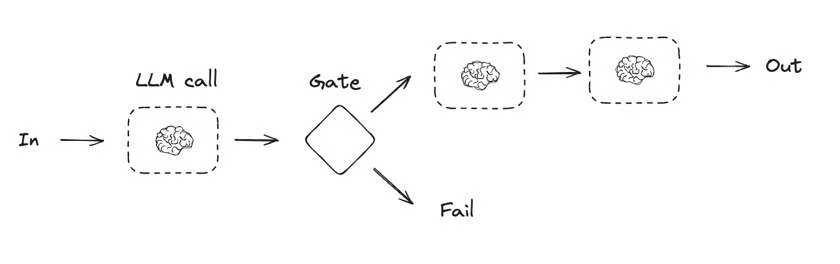
链式提示 适用于执行定义明确、可拆分、可验证步骤的任务
链式提示的示例:
from typing_extensions import TypedDict
from langgraph.graph import StateGraph, START, END

# 共享状态:各节点只更新自己负责的字段
class State(TypedDict):
    topic: str
    joke: str
    improved_joke: str
    final_joke: str

# 节点1:根据 topic 生成笑话初稿
def generate_joke(state: State):
    return {"joke": llm.invoke(f"Write a short joke about {state['topic']}").content}

# 质检门(不是节点):检查文本是否含特殊符号(? 或 !)
def check_punchline(state: State):
    return "Pass" if any(c in state["joke"] for c in "?!") else "Fail"

# 节点2:改进和润色文本
def improve_joke(state: State):
    return {"improved_joke": llm.invoke(f"Make this joke funnier by adding wordplay: {state['joke']}").content}

# 节点3:增加反转情节
def polish_joke(state: State):
    return {"final_joke": llm.invoke(f"Add a surprising twist to this joke: {state['improved_joke']}").content}

# 构建图,用于 Agent 编排
workflow = StateGraph(State)
workflow.add_node("generate_joke", generate_joke)
workflow.add_node("improve_joke", improve_joke)
workflow.add_node("polish_joke", polish_joke)
workflow.add_edge(START, "generate_joke")
# 状态质检:Pass 直接结束;Fail 进入改进支路
workflow.add_conditional_edges("generate_joke", check_punchline, {"Fail": "improve_joke", "Pass": END})
workflow.add_edge("improve_joke", "polish_joke")
workflow.add_edge("polish_joke", END)

chain = workflow.compile()

# Agent 测试与输出
state = chain.invoke({"topic": "cats"})
print("初稿:", state["joke"])
if "improved_joke" in state:
    print("改进稿:", state["improved_joke"])
    print("终稿:", state["final_joke"])
else:
    print("终稿(初稿直接通过):", state["joke"])
Parallelization 并行处理
并行处理,常见的用法有两种
- 同时运行拆分后对多个独立子任务(提高效率)
- 多次运行同一个任务并检查输出(提高置信度)
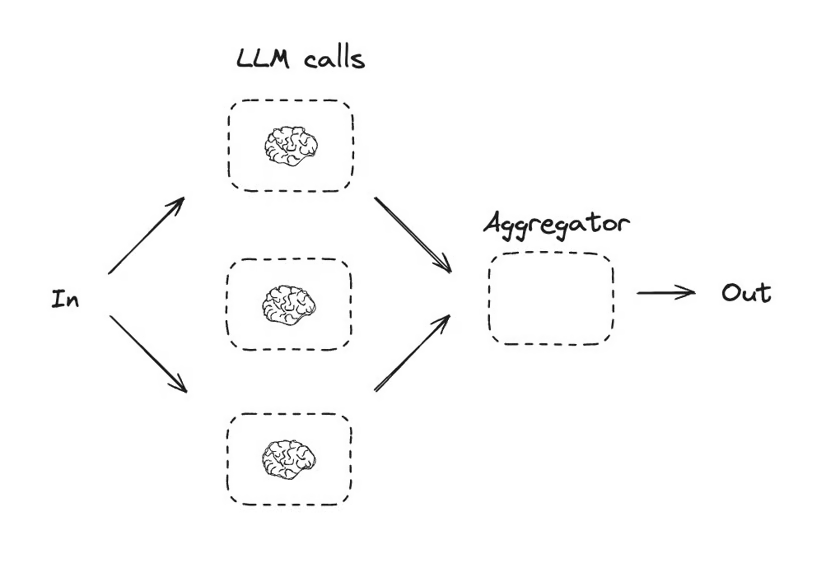
并行处理的示例:
from typing_extensions import TypedDict
from langgraph.graph import StateGraph, START, END

# 共享状态:三个并行节点各写各的字段,互不冲突
class State(TypedDict):
    topic: str
    joke: str
    story: str
    poem: str
    combined_output: str

# 三个可并行处理的独立任务(不同topic)
def call_llm_1(state: State):   # 写 joke
    return {"joke": llm.invoke(f"Write a joke about {state['topic']}").content}

def call_llm_2(state: State):   # 写 story
    return {"story": llm.invoke(f"Write a story about {state['topic']}").content}

def call_llm_3(state: State):   # 写 poem
    return {"poem": llm.invoke(f"Write a poem about {state['topic']}").content}

# 输出聚合:等三个并行节点都完成后才执行,读取三份结果拼装
def aggregator(state: State):
    return {"combined_output": (
        f"Here's a story, joke, and poem about {state['topic']}!\n\n"
        f"STORY:\n{state['story']}\n\n"
        f"JOKE:\n{state['joke']}\n\n"
        f"POEM:\n{state['poem']}"
    )}

# 构建图,用于 Agent 编排
builder = StateGraph(State)
for name, fn in [("call_llm_1", call_llm_1), ("call_llm_2", call_llm_2),
                 ("call_llm_3", call_llm_3), ("aggregator", aggregator)]:
    builder.add_node(name, fn)

for n in ["call_llm_1", "call_llm_2", "call_llm_3"]:
    builder.add_edge(START, n)        # 扇出:三个节点并行启动
    builder.add_edge(n, "aggregator") # 扇入:都完成后才进 aggregator

builder.add_edge("aggregator", END)
parallel_workflow = builder.compile()

# Agent 测试与输出
state = parallel_workflow.invoke({"topic": "cats"})
print(state["combined_output"])
Routing 路由机制
路由机制,通过预定义的路由规则,将特定输入指向对应的下游任务
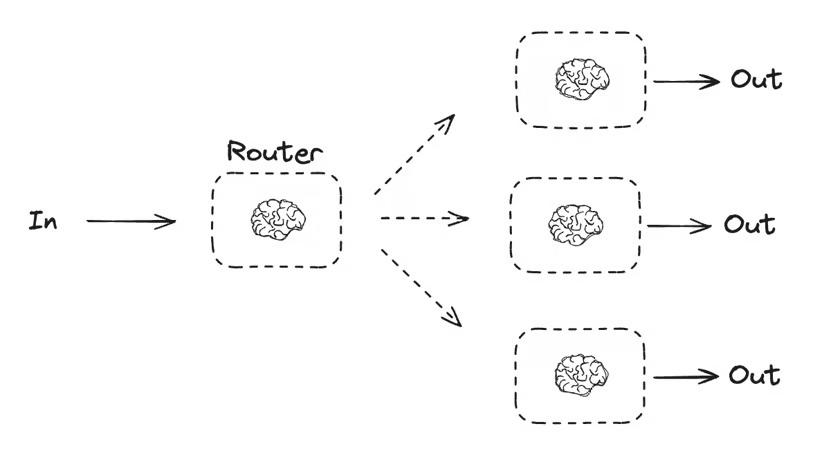 路由机制的示例:
from typing_extensions import Literal, TypedDict
from pydantic import BaseModel, Field
from langchain_core.messages import HumanMessage, SystemMessage
from langgraph.graph import StateGraph, START, END


# 路由决策 schema:用 Literal 把可选值锁死为三种,LLM 只能三选一
class Route(BaseModel):
    step: Literal["poem", "story", "joke"] = Field(description="下一步:写诗/写故事/写笑话")

# 限制 LLM 的结构化输出:调用结果必须是 Route 对象
router = llm.with_structured_output(Route)


# 共享状态:input 是原始请求;decision 是路由结果;output 是最终内容
class State(TypedDict):
    input: str
    decision: str
    output: str


# 决策节点:调 router 进行路由决策(写诗/写故事/写笑话),不生成内容
def llm_call_router(state: State):
    decision = router.invoke([
        SystemMessage(content="Route the input to story, joke, or poem based on the user's request."),
        HumanMessage(content=state["input"]),
    ])
    return {"decision": decision.step}


# 三个任务节点:写诗/写故事/写笑话
def llm_call_1(state: State):  # story
    return {"output": llm.invoke(state["input"]).content}

def llm_call_2(state: State):  # joke
    return {"output": llm.invoke(state["input"]).content}

def llm_call_3(state: State):  # poem
    return {"output": llm.invoke(state["input"]).content}


# 路由函数(不是节点,是 Gate):根据决策结果,返回下一个节点名
def route_decision(state: State):
    return {"story": "llm_call_1", "joke": "llm_call_2", "poem": "llm_call_3"}[state["decision"]]


# 构建图,用于 Agent 编排(一个决策节点 + 三个任务节点)
builder = StateGraph(State)

for name, fn in [
    ("llm_call_router", llm_call_router),
    ("llm_call_1", llm_call_1),
    ("llm_call_2", llm_call_2),
    ("llm_call_3", llm_call_3),
]:
    builder.add_node(name, fn)
builder.add_edge(START, "llm_call_router")
# 条件边:根据 route_decision 的返回值,三选一进入对应生成节点
builder.add_conditional_edges(
    "llm_call_router",
    route_decision,
    {"llm_call_1": "llm_call_1", "llm_call_2": "llm_call_2", "llm_call_3": "llm_call_3"},
)

# 三个任务节点各自结束后,流程终止
for n in ["llm_call_1", "llm_call_2", "llm_call_3"]:
    builder.add_edge(n, END)

router_workflow = builder.compile()

# Agent 测试:输入“写个关于猫的笑话”,router 应返回 joke,走 llm_call_2
state = router_workflow.invoke({"input": "Write me a joke about cats"})
print(state["output"])
Orchestrator-worker 编排与执行
编排与执行,将任务拆分后执行,然后汇总执行结果
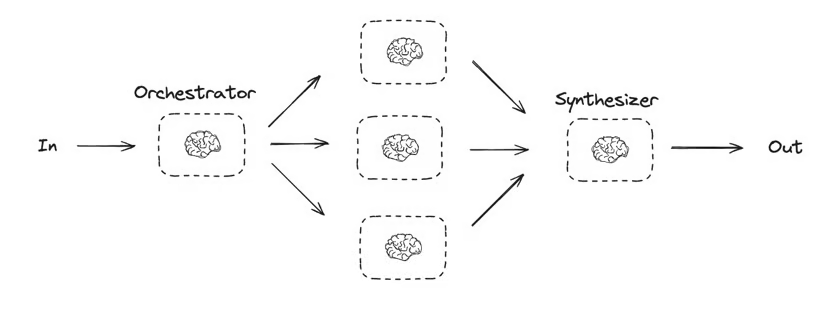
编排与执行的示例:
from langgraph.types import Send


# 主图状态,主题/章节/已完成章节(可拆分执行)/最终报告
class State(TypedDict):
    topic: str
    sections: list[Section]
    completed_sections: Annotated[
        list, operator.add
    ]
    final_report: str

# Worker 状态:每个工作节点只接收自己负责的 section
class WorkerState(TypedDict):
    section: Section  # 当前 worker 负责的章节
    completed_sections: Annotated[list, operator.add]  # 并行写入,靠 reducer 合并


def orchestrator(state: State):
    """编排器:为报告撰写生成编排/计划"""

    # 生成章节规划
    report_sections = planner.invoke(
        [
            SystemMessage(content="Generate a plan for the report."),
            HumanMessage(content=f"Here is the report topic: {state['topic']}"),
        ]
    )

    # 把规划出的章节列表写入主状态
    return {"sections": report_sections.sections}


def llm_call(state: WorkerState):
    """Worker:撰写报告的一个章节"""
    section = llm.invoke(
        [
            SystemMessage(
                content="Write a report section following the provided name and description. Include no preamble for each section. Use markdown formatting."
            ),
            HumanMessage(
                content=f"Here is the section name: {state['section'].name} and description: {state['section'].description}"
            ),
        ]
    )
    # 已完成的章节追加到 completed_sections(返回列表以配合 operator.add)
    return {"completed_sections": [section.content]}


def synthesizer(state: State):
    """汇总结果:把所有章节合成为完整报告"""
    completed_sections = state["completed_sections"]
    completed_report_sections = "\n\n---\n\n".join(completed_sections)
    return {"final_report": completed_report_sections}

def assign_workers(state: State):
    """为计划中的每个章节分配一个工作节点"""
    # 通过 Send() API 并行启动各章节的撰写
    # 每个 Send 携带独立的 {"section": s},作为对应 worker 的 WorkerState
    return [Send("llm_call", {"section": s}) for s in state["sections"]]


# 构建工作流
orchestrator_worker_builder = StateGraph(State)

# 添加节点
orchestrator_worker_builder.add_node("orchestrator", orchestrator) # 编排器节点
orchestrator_worker_builder.add_node("llm_call", llm_call) # 工作节点(会被动态派发多次)
orchestrator_worker_builder.add_node("synthesizer", synthesizer) # 汇总节点

# 添加边连接节点
orchestrator_worker_builder.add_edge(START, "orchestrator") # 入口 → 编排器
orchestrator_worker_builder.add_conditional_edges(
    "orchestrator", assign_workers, ["llm_call"]
)  # 编排器之后,由 assign_workers 动态派发 N 个工作节点
orchestrator_worker_builder.add_edge("llm_call", "synthesizer") # 所有 worker 完成后 → 汇总节点
orchestrator_worker_builder.add_edge("synthesizer", END) # 汇总节点 → 结束

# 编译工作流
orchestrator_worker = orchestrator_worker_builder.compile()

# 显示工作流图(原代码为 IPython 环境)
display(Image(orchestrator_worker.get_graph().draw_mermaid_png()))

# Agent 调用:先规划,再并行写各章节,最后汇总结果
state = orchestrator_worker.invoke({"topic": "Create a report on LLM scaling laws"})

# 以 Markdown 形式展示最终报告(原代码为 IPython 环境)
from IPython.display import Markdown
Markdown(state["final_report"])
Evaluator-optimizer 评估与优化
评估与优化,对 LLM 结果进行评估,并将评估反馈给 LLM 用于结果的优化和重新生成,重复以上过程知道评估结果满足预定义的接受条件(评估过程可以是 LLM 输出,也可以是人工反馈结果)
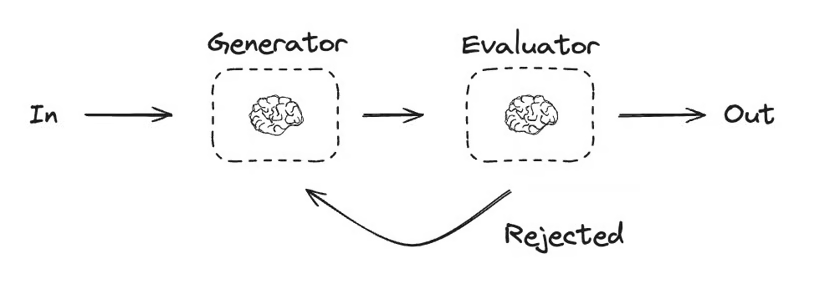 评估与优化的示例:
# 图状态
class State(TypedDict):
    joke: str          # 当前笑话
    topic: str         # 笑话主题
    feedback: str      # 评估器给出的改进反馈
    funny_or_not: str  # 评估结果:"funny" 或 "not funny"


# 用于评估的结构化输出 schema
class Feedback(BaseModel):
    grade: Literal["funny", "not funny"] = Field(
        description="判断这个笑话是否好笑。",
    )
    feedback: str = Field(
        description="如果笑话不好笑,给出如何改进的反馈。",
    )

# 给 LLM 套上结构化输出 schema
evaluator = llm.with_structured_output(Feedback)

def llm_call_generator(state: State):
    """LLM 生成一个笑话"""

    # 如果已有反馈,就带着反馈重写;否则直接按主题生成
    if state.get("feedback"):
        msg = llm.invoke(
            f"Write a joke about {state['topic']} but take into account the feedback: {state['feedback']}"
        )
    else:
        msg = llm.invoke(f"Write a joke about {state['topic']}")
    return {"joke": msg.content}

def llm_call_evaluator(state: State):
    """LLM 评估笑话"""
    # 调评估器打分,写入 funny_or_not 和 feedback
    grade = evaluator.invoke(f"Grade the joke {state['joke']}")
    return {"funny_or_not": grade.grade, "feedback": grade.feedback}


# 条件边函数:根据评估器的反馈,路由回笑话生成器或结束
def route_joke(state: State):
    """根据评估器的反馈,路由回笑话生成器或结束"""
    if state["funny_or_not"] == "funny":
        return "Accepted"               # 好笑:结束
    elif state["funny_or_not"] == "not funny":
        return "Rejected + Feedback"    # 不好笑:带反馈回到生成器

# 构建工作流
optimizer_builder = StateGraph(State)

# 添加节点
optimizer_builder.add_node("llm_call_generator", llm_call_generator)   # 笑话生成节点
optimizer_builder.add_node("llm_call_evaluator", llm_call_evaluator)   # 笑话评估节点

# 添加边连接节点
optimizer_builder.add_edge(START, "llm_call_generator")                # 入口 → 生成器
optimizer_builder.add_edge("llm_call_generator", "llm_call_evaluator") # 生成器 → 评估器
optimizer_builder.add_conditional_edges(
    "llm_call_evaluator",
    route_joke,
    {  # route_joke 的返回值 : 下一个要访问的节点名
        "Accepted": END,
        "Rejected + Feedback": "llm_call_generator",   # 回到生成器,形成循环
    },
)

# 编译工作流
optimizer_workflow = optimizer_builder.compile()

# 显示工作流图
display(Image(optimizer_workflow.get_graph().draw_mermaid_png()))

# 调用与测试
state = optimizer_workflow.invoke({"topic": "Cats"})
print(state["joke"])
LangGraph 核心能力
Persistence 持久化
LangGraph 支持检查点 <code>checkpointer</code> 和存储 <code>store</code> 两种形式的持久化方案
持久化的简单示例:
from langgraph.checkpoint.memory import InMemorySaver
from langgraph.store.memory import InMemoryStore

checkpointer = InMemorySaver()
store = InMemoryStore()

graph = builder.compile(checkpointer=checkpointer, store=store)

result = graph.invoke(
    {"messages": [{"role": "user", "content": "Hi, my name is Bob."}]},
    {"configurable": {"thread_id": "thread-1"}},
)
两种持久化方案的对比:
| 对比维度 | Checkpointer(检查点保存器) | Store(存储) |
|---|---|---|
| 持久化内容 | 图状态快照 | 应用定义的键值数据 |
| 作用范围 | 单个线程 | 跨线程 |
| 记忆类型 | 短期、线程范围内记忆 | 长期、跨线程记忆 |
| 适用场景 | 对话连续性、人机交互、回放与容错 | 用户偏好、事实与共享知识 |
| 访问方式 | 在图配置中传入 thread_id |
在节点或应用中读写项目 |
长时间对话会导致检查点不断累积,增加延迟和存储成本,建议定期清理
Fault tolerance 容错性
LangGraph 提供了三种可组合的异常响应机制
- 重试(Retries),根据错误类型设置失败后的自动重试次数
- 超时(Timeouts),限制单次尝试的运行时间或空闲时长
- 错误处理(Error handling), 重试耗尽后的兜底函数
容错机制的示例:
from datetime import timedelta
from langgraph.types import Command, TimeoutPolicy, RetryPolicy
from langgraph.errors import NodeError
from langgraph.graph import StateGraph, START
from typing_extensions import TypedDict

# (1)重试(Retries),根据错误类型设置失败后的自动重试次数
builder.add_node(
    "call_api",
    call_api,
    retry_policy=RetryPolicy(max_attempts=3),
)

# (2)超时(Timeouts),限制单次尝试的运行时间或空闲时长
builder.add_node("call_model", call_model, timeout=60)
builder.add_node("call_model", call_model, timeout=timedelta(minutes=2))
builder.add_node("call_model", call_model,
    timeout=TimeoutPolicy(run_timeout=120, idle_timeout=30),
)

# (3)错误处理(Error handling), 重试耗尽后的兜底函数

class State(TypedDict):
    status: str

def charge_payment(state: State) -> State:
    raise RuntimeError("payment gateway timeout")

def payment_error_handler(state: State, error: NodeError) -> Command:
    """兜底函数,在节点失败后更新状态,并路由到其他节点"""
    return Command(
        update={"status": f"compensated: {error.error}"},
        goto="finalize",
    )

def finalize(state: State) -> State:
    return state

graph = (
    StateGraph(State)
    .add_node(
        "charge_payment",
        charge_payment,
        retry_policy=RetryPolicy(max_attempts=3, retry_on=ConnectionError),
        error_handler=payment_error_handler,
    )
    .add_node("finalize", finalize)
    .add_edge(START, "charge_payment")
    .compile()
)
- 重试机制,还可以灵活设置重试的时间间隔策略
Event streaming 事件流
大多数应用程序和前端用例都推荐使用基于 stream_events 的事件流处理方式:
from langchain.agents import create_agent


def get_weather(city: str) -> str:
    """Get weather for a city."""
    return f"It's always sunny in {city}!"


agent = create_agent(
    model="gpt-5-nano",
    tools=[get_weather],
)

stream = agent.stream_events({
    "messages": [{"role": "user", "content": "What is the weather in SF?"}],
}, version="v3")

for message in stream.messages:
    for delta in message.text:
        print(delta, end="", flush=True)

final_state = stream.output
事件流 stream 的内容概述:
stream.messages:LLM 调用返回的消息对象,包括消息文本、推理过程和工具调用stream.values:Agent 状态快照(每次图执行步骤都会产出一个完整状态快照)stream.output:最终的 Agent 状态(包含整个 Agent 运行完成后的最终结果)stream.subgraphs:嵌套图的运行流(子 Agent 和普通子图的执行及其结果)stream.extensions:自定义的信息输出,比如进度日志、业务时间或 UI 专用数据stream.tool_calls:工具执行的生命周期,包括输入调用、流式输出、最终输出和错误
Interrupts 中断机制
LangGraph 允许在特定节点暂停图的执行,并等待外部输入后再继续
中断机制的示例:
from langgraph.types import interrupt

def approval_node(state: State):
    # 暂停,并请求批准
    approved = interrupt("Do you approve this action?")
    # 恢复时,Command(resume=...) 的值会在这里作为返回值返回
    return {"approved": approved}

from langgraph.types import Command

# 首次运行——触发 interrupt 并暂停
# thread_id 是持久化指针(生产环境中应存储一个稳定的 ID)
config = {"configurable": {"thread_id": "thread-1"}}
stream = graph.stream_events({"input": "data"}, config=config, version="v3")

# 消费流以驱动运行;stream.output 等待最终状态
final = stream.output

# 当运行因等待人工输入而暂停时,stream.interrupted 为 True;
# stream.interrupts 包含传给 interrupt() 的负载
if stream.interrupted:
    print(stream.interrupts)
    # > (Interrupt(value='Do you approve this action?'),)

# 用人工响应恢复
# resume 负载会成为节点内 interrupt() 的返回值
resumed = graph.stream_events(Command(resume=True), config=config, version="v3")
final = resumed.output
当多个并行分支同时发生中断时,可以根据中断 ID 来一次性进行映射和恢复
中断机制的常见使用场景:
- 流程审批,在执行关键操作(API 调用、数据库更改、财务交易)之前暂停
- 审核和编辑,允许人工审核和修改 LLM 输出或工具调用,然后再继续执行
- 工具暂停,在执行工具调用之前暂停,以便查看和编辑工具的调用
- 人工输入验证,在进行下一步之前,暂停以验证人工输入
利用中断机制可以实现逐节点的图执行,方便图的调试与测试
Time travel 回放机制
LangGraph 可以利用回放机制来进行回溯与创建新分支
- 回溯(Replay),返回之前的检查点,并进行重新尝试
- 创建新分支(Fork),返回之前的检查点,并探索其他路径
回放机制的示例:
from langgraph.graph import StateGraph, START
from langgraph.checkpoint.memory import InMemorySaver
from typing_extensions import TypedDict, NotRequired
from langchain_core.utils.uuid import uuid7

class State(TypedDict):
    topic: NotRequired[str]
    joke: NotRequired[str]

def generate_topic(state: State):
    return {"topic": "socks in the dryer"}

def write_joke(state: State):
    return {"joke": f"Why do {state['topic']} disappear? They elope!"}

checkpointer = InMemorySaver()
graph = (
    StateGraph(State)
    .add_node("generate_topic", generate_topic)
    .add_node("write_joke", write_joke)
    .add_edge(START, "generate_topic")
    .add_edge("generate_topic", "write_joke")
    .compile(checkpointer=checkpointer)
)

config = {"configurable": {"thread_id": str(uuid7())}}
result = graph.invoke({}, config)

# 找到 write_joke 之前的检查点,进行回溯
history = list(graph.get_state_history(config))
for state in history: # 历史记录按时间倒序排列
    print(f"next={state.next}, checkpoint_id={state.config['configurable']['checkpoint_id']}")
before_joke = next(s for s in history if s.next == ("write_joke",))
replay_result = graph.invoke(None, before_joke.config)

# 找到 write_joke 之前的检查点,创建新分支
history = list(graph.get_state_history(config))
before_joke = next(s for s in history if s.next == ("write_joke",))
fork_config = graph.update_state(
    before_joke.config,
    values={"topic": "chickens"},
) # 更新状态后,用新的 topic 重新执行
fork_result = graph.invoke(None, fork_config)
print(fork_result["joke"])